Showing posts with label IOS. Show all posts

11 Mar 2014

Apple iOS 7.1 Available for Download, Comes with CarPlay, Improved Siri and Big iPhone 4 performance improvements

,

Finally iOS 7.1 version is available for download with major improvements and new features and multiple bug fixing list.

CarPlay
Vehicles who were born lucky enough to come equipped with an intelligent dashboard that supports Apple’s CarPlay engineers, can now be paired with a simple iOS device, all with the hopes of streaming musing, maps, messages and 3rd party audio applications. Besides these, owners can also control the phone distribution system and even Siri.

Siri
Speaking of the devil, Siri now has a new way of knowing that you have stopped issuing orders. Instead of simply acknowledging your silence, users can gently press the homebutton at the start of a phrase and release it when they are done. A more rudimentary, but well-welcomed feature. Moreover, Siri is now even more friendlier for those who speak Mandarin Chinese, UK English, Australian English and Japanese .

iTunes Radio
The search function in the integrated Radio can now easily find stations based on the current playlist, while users can buy albums directly from the Play tab. Subscription has also been included, as a way to divert ads.

Calendar
The iOS calendar can now display events that spawn during a full month and also, some country specific holidays have been added.

Accessibility
wide range of bold font options have been added, alongside icon tweaks, Reduce Motion options for several applications and new options to display button shapes.

Performance improvements on iPhone 4
As anyone who has used iOS 7 on an iPhone 4 will tell you, the older hardware is nearly incapable of keeping up with the newer software. Even with the disabled visual effects and other concessions attempting to keep things running smoothly, the entire system suffered from laggy animations and other problems. 


iOS7 Hands-on Video 

)
Read more

31 Aug 2013

iOS7 Vs Android

,
There are many features in apple new iOS 7 iPhone update feel like Android. If you compare iOS 7 features with Android 4.2.2 you do not see any changes, we think their graphics are also similar to android 4.2.2, According to apple they said they improved iPhone's battery life and now iPhone users get more useful or more enjoyable their iPhone. Performance wise iOS7 is more powerful then Android. 
See also iOS7 Features..

Lock Screen Design:


The iPhone new iOS7 update has a new lock screen, Now you can see the big screen wallpaper on your iPhone like as a nexus android operating system. In IOS 6 apple provides slide to unlock (right side) but now they have changed the style and direction to unlock your iPhone. 

Notification Center:


Android Smartphone has the best control panel center with your own google account profile picture(Especially Google Nexus 4), Now look what apple has made for Ios 7 it's almost the same only difference is they apple has slid up to see control panel settings. But thank god apple made this control panel because this is the most usable settings on the phone. 

Wallpaper:


wallpapers is a new home screen background in which your screen Wallpaper moving with the motion of your phone. This is not same as Android Smartphone but their use on home screen with scrolling the apps page.

Multitasking:


Multitasking on Apple iPhone, Is this copied this feature from android we think so. Multitasking shows you how many apps that are open so you can close them just 1 slide down. 

Browsing Tabs:


The new update on iOS 7 in safari browsing first the new look and layout of safari browser and added some new features like chrome slide tab to close multitasking in safari browser and many more.
Read more

4 Jul 2013

Apple iOS7 Features

,
World famous brand Apple unveiled it's now operating system iOS7  which includes new features like Multitasking, Control panel, New safari browser and New lock screen and many more features  

New Lock Screen:
The iPhone new iOS7 update has a new lock screen, Now you can see the big screen wallpaper on your iPhone  just like Android lock screen. In IOS 6 apple provides slide to unlock (right side) but now they have changed the style and direction to unlock your iPhone. 

Control panel(Control center):
In iOS7 Just slide up to see the control panel. We can control or navigate Settings, brightness, Wifi, bluetooth, and many more.Already cydia app  battery dactor pro  is providing same features in jailboken iPhone(6.1.3 and before).

Dynamic Wallpaers:

Dynamic wallpapers is a new home screen background in which your screen Wallpaper moving with the motion of your phone.

Multitasking:

Multitasking shows you how many apps that are open so you can close them just 1 slide down. 

New safari with Tabs:
The new update on iOS 7 in safari browsing first the new look and layout of safari browser and added some new features like chrome slide tab to close multitasking in safari browser

See also ultimate control panel app for jailbroken iphone(you can feel like ios7 control panel)
Read more

24 Dec 2012

App of the day:'Appoday' provides Everyday Free App Deal

,
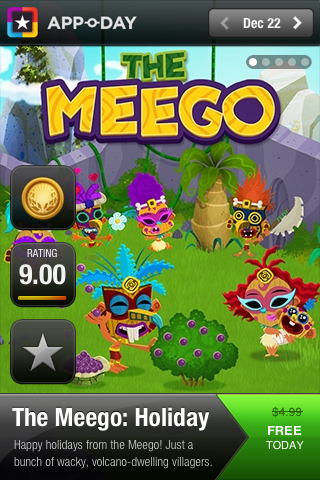
Appoday is a Awesome App for iPhone and iPad. Appoday provides source for an incredible app deal everyday.If you want download new free app everyday, just download Appoday on your iOS device from the App Store.Then you will get every day one free new App.In this app you can see the Previous day deal, Today deal and Tomorrow deal as well.
HOW IT WORKS:
  • 3 Deals in One: Today's, Yesterday's and Tomorrow's 
  • Incredible Quality: Our experts find the best apps and games
  • It’s All Free: Appoday negotiate a free deal for you, every day
  • Limited-Time: Deals are available for a limited-time only
  • Get Notified: Be the first of your friends to find today’s amazing deal
Here is the iTunes Link to Download Appoday App.
Read more

19 Dec 2012

iOS7 Concept Design :Images

,

Popular Tech website TheVerge published iOS7 design Concept pics..hope we except these inspiring features available on Apple's Next product (iPhone5S).
Here we posting some images of  Lock Screen and Nike plus GPS App..

Lock Screen Images:


 Nike Plus GPS App Images:

Read more

6 Dec 2012

Bluetooth stickers helps to locate missing items

,
A US technology firm has come up with New Bluetooth stickers called StickNFind which can be attached to your objects like wallets, keys, and even kids and pets to track them. This Strickers can sync with a smartphone app(App 'Radar' are available for Download in both App Store and Google Play App Store ). This StickNFind having a range of about 100 feet and a battery life that reportedly lasts almost a year.
Usage of StickNFind : The objects you tag with the stickers are displayed on the app's screen, which lets you know how far away you are from them. If you lose something that's tagged, you can tap the object on your phone's screen, and the sticker will buzz and light up.You can attach this stickers to the Wallets, Pets,Kids,Bags and etc.


-->

Specs and Requirements:

Specs:
Technology: Bluetooth 4.0 (Bluetooth Low Energy) Range: Approximate 100 Feet with line of sight. Battery: Lasts up-to 1 year based on 30 minutes per day average use. Battery Type: CR2016 watch battery. Battery is replaceable


Requirements: 

  • iOS devices with Bluetooth 4.0 (iPhone 4s, iPhone 5, new iPad, New Touch, mini iPad) 
  • Android devices supporting Bluetooth Low Energy, running Android 4.0 and newer. We have tested it with Samsung S3, and Note 2. We will post more phones tested as we finish the Android app.

Size and weight of each Sticker: 
Diameter: 0.98 Inches diameter x Thickness 0.16 Inches (24mm Diameter x 4mm) and Weight: 0.15 ounces (4.5 grams)

Hands on Video:


Source: indiegogo
Read more

22 Nov 2012

Nokia's Here Maps App Launches for iOS

,

Nokia unveiled new free Maps app called HERE maps. HERE maps provides access to Nokia's new cloud-based map service, which will be available across multiple operating systems for mobiles.Nokia this week released its new HERE maps app for iOS.
"People want great maps, and with HERE we can bring together Nokia's location offering to deliver people a better way to explore, discover and share their world," Nokia president and CEO Stephen Elop said.

The layout of Nokia HERE Maps is similar to Apple Maps.It is also similar to www.here.net web app.HERE offers many of the features consumers expect with their mapping solutions. Like Apple maps, there's voice-guided directions, and you can navigate via driving, walking, or public transportation.
Nokia HERE provides several views: map, satellite, public transport, and live traffic. On the traffic front, you can drill down by accidents, construction, congestion, and other.

A "Collections" section, meanwhile, allows users to "collect places to remember" for future reference. You can also save a particular area of a map.

The free app is available for Download in the App Store now for devices running iOS 4.3 and higher. On Google Play, the store is currently only offering an Nokia HERE (unofficial) app.
iTunes Download Link: Here Maps 
Read more

5 Oct 2012

How to use iOS Device As a Wireless Flash Drive

,


Here we are going to show you how to use iOS device as a wireless(WiFi) Flash drive.Here one App called Wireless Drive cost about $0.99 Available on iTunes Store.Using this app we can use iOS device as a Flash Drive.

Features of this App:
SUPPORT CLOUD STORAGE : 
Support Dropbox and iCloud storage.
MULTIMEDIA PLAYER : 
An ability to play all audio files from a folder as a playlist with repeat, shuffle, background playback and remote control from multitask.
HTTP/FTP PASSWORD PROTECTED : 
Files transfer between PC/Mac with password protected.
FILE OPERATION: 
Move, Copy, Rename, Delete, Zip, Unzip, Create File and Folder.
FILE SHARING: 
File sharing with other iOS devices via Bluetooth or Wi-Fi connection with automatic search of nearest available devices around you.
EASY FILE UPLOAD: 
Drag and drop files upload via your PC/Mac web browser or USB via iTunes.
TEXT EDITOR: 
Built-in text editor that allows you to edit your text files or source codes on your iOS device.
IMPORT/ FILES CREATION: 
An ability to create text files, image captures, video records, voice recordings and import pictures from photo library.
PASSCODE LOCK: 
An ability to protect your files from viewing by others.
SUPPORT OF VARIOUS FILE FORMATS: 
Document viewer that supports various formats.
UNIVERSALITY: 
This app is developed for both iPhone and iPad, you need to purchase only once.


Read more

4 Oct 2012

The 8 Worst Things about iOS 6 : Review

,
1. Cramped App Store:

Although the Apple App Store's makeover is an improvement in aesthetics, search results are limited to one at a time via the iPhone, so you have to do a lot more scrolling. In theory, it's smart to highlight quality over quantity, but it doesn't always hit the mark. Plus, the layout is a bit cramped.

2. Maps Apps

Apple's new Maps app has been perhaps the most discussed and most griped about new feature on iOS 6 so far. In addition to the app omitting transit directions, users discovered that mapping imagery included a confusing cluster of broken roads, misplaced clouds and national monuments all out of whack.

3. YouTube App

Although everyone has been buzzing about the missing the Google Maps app, the Google-owned YouTube app is gone too. However, unlike Google Maps, a new (superior) version is downloadable via the Apple App Store.


4. Too Much Facebook

When Apple opened up social integration to Facebook, which will be key for allowing users to share pictures and post status updates without having to log into the app, it also merged your Facebook contacts and calendar automatically. The good news is that it's possible to turn off the default function if you feel overwhelmed with information.

5. Inconsistent Fonts

The Find My iPhone feature includes a font we haven't seen on iOS before, and it's inconsistency with the rest of the software has some perplexed.

6. Inconsistent Colors

Although some seem to love the color changes made to certain built-in apps, others are bothered that the new schemes aren't consistent throughout the interface. For example, the main coloring for the phone app went from black to silver, while the camera app went from silver to black.


7. Constant Alerts

iOS 6 has introduced a slew of new features to keep you on top of meetings, birthdays and events, but it also loves to remind you over and over (and over) again when things are coming up or there is a change to iCloud calendars you're subscribed to.


8. Buggy Calendar

Tapping "Today" button in the Calendar app can cause it to become skittish for some users. In fact, it can sometimes scroll mysteriously moving all by itself. Gremlins or just a bug?


                                                               (Reposted from Mashable)


Read more

28 Sept 2012

Top Free Map Apps for iPhone and iPad: Alternative for Apple Maps

,

Many Apple Users are unhappy with Apples new Apple Maps that replaced by Google Maps.Here we posting Free Map Apps for iPhone and iPad .

Bing Maps:
This App offering excellent service regarding Listing and directions and all.Clarity og the map also good.This App also Search, Deals and Maps.

OpenMaps:
This OpenMaps App offering  map services based on the openstreetmap.org

MapQuestApp:
This MapQuestMap also offering excellent Map services.This is a oldest online map service.It is also providing service called Live Traffic Updates and all..

Google Earth:
This is not a exact Map service,but using this map we can find business locations and Roads and all.

Hope Apple will fix all the issues in future IOS updates..
Read more

How to Access Google Maps on iOS 6 Devices(iPhone,iPad and iPod)

,

All the apple users are unhappy with Apples's new Apple Maps in iOS6.Apple replaced Google Maps App With their Apple Maps.Google Maps App is the amazing services compare with any other Maps Apps services.Here we are going to show how to access Google Maps in iPhone,iPad and iPod (iOS 6) 

Steps:
  • Launch Safari Browser
  • Type maps.google.com (Link) in address bar .
  • Adding the Google Maps by tapping Arrow Mark(showing below image),then Select Add to Home Screen Option.
  • Google Maps Icon appears on the Home Screen.


Read more

14 Sept 2012

Upgrade to iOS 6 : Quick Links

,


We won't see iOS 6 an official release until September 19th, you can install the final version right now even if you're not a developer thanks to some anonymous public postings of the software update files. Here's how.
Backup First
Before you do anything, back up your iDevice with iTunes. In the past, the early upgrade process worked for some but not for everyone. The results may be the same this time around, though we've upgraded to the final version of iOS 6 without issue. Regardless of whether or not things work out you will need to restore your device so back it up!

Download iOS 6

Thanks to a public posting on RapidShare, you can download the Golden Master version (essentially identical to the final release coming next week) of iOS 6 for your device without logging into the Apple Developer Center. Here are the download links. 
Choose the type of device you want to update:
The iOS 6 update may require a later version of iTunes than you have installed. Update your copy before moving on.

Install the Update

To install iOS 6 on your device, follow these instructions:
  1. Open up the disk image (.dmg) and find the iPhone Software Update file (.ipsw) for your device. Drag it to the desktop, or a folder of your choosing. (Windows users will need a tool like 7-Zip to do this, and will need to open the .hfs inside the .dmg as well.)
  2. Open iTunes and connect your iPhone, iPad, or iPod touch, to your computer.
  3. If your device isn't automatically selected in iTunes, select it and go to the "Summary" tab.
  4. Hold down the option key (OS X) or the shift key (Windows) and click the Restore button. Browse to the .ipsw file you downloaded, select it, and wait for the update to finish.
  5. If necessary, restore your device from backup and sync with iTunes.
That's it. If you follow those steps, you'll be up and running iOS 6 in no time.
Note: We updated a handful of iDevices using these files and encountered no issues, but because we're unable to verify them all we don't know problems won't arise. This process worked for us when we tested with an iPad, and iPod touch, and an iPhone, but there's always a chance you could run into an issue. Please be aware that there's some risk involved before you upgrade.

(via:Gizmodo)

Read more

2 Sept 2012

New VMware Horizon Suite delivers apps, data to any device

,
VMware said Horizon Mobile, which puts a virtual work phone on an employee’s personal phone, will support Apple iOS as well as Google Android.


VMware said its new Horizon Mobile technology, which runs a work phone as a virtual instance on an employee’s personal smartphone, will run on Apple iOS devices as well as those running the Google Android OS.
When VMware unveiled Horizon Mobile at VMworld 2011, it only supported Android, which struck some industry observers as a big shortcoming. But Hoofar Razavi, director of product management for mobile solutions at VMware, said it had been on VMware’s road map all along to support iOS.
Horizon Mobile is VMware’s response to the bring-your-own-device (BYOD) trend in the workplace, in which employees want to use their own smartphones or tablet computers at work. But while BYOD is popular with workers, it presents a dilemma to the IT staff that has to manage network access and secure corporate data on multiple device brands and platforms.
With Horizon, the IT staff emails an employee a link to a site, which they access from the device they want to use and, from that link, set a pass code that verifies that the employee and the device are approved. The company then delivers the virtual instance to the device over the air.
The IT professional operates from a dashboard, called the Horizon Broker that sets up the virtual “workspace,” as Razavi put it, including all the business applications the worker needs to do their job. The number of apps included depends on their job and the access for which they’ve been approved for various corporate data.


Why should companies use Horizon Mobile?


Horizon Mobile is VMware’s response to bring-your-own-device trend in the workplace, in which employees favor their own devices for work-related tasks, and not the ones provided by the company. It’s fairly easier to do the work required with a machine used by the prior employee , but most companies fear about security and accessibility issues. There remains a single question, though, will Apple approve this?
With Horizon Mobile, all iOS personal devices can be used without stress within a company. All that has to be done by the worker is to access a link supplied by the IT staff and set a pass code to verify the device within the circle. Then, the company itself delivers a virtual instance of the “work” device over the air, transforming something used for media viewing and other tasks into a professional tool.


Read more

28 Aug 2012

Maxthon 3 New Web Browser for iPhone and iPad

,
Maxthon, a global software company that develops state-of-the-art web browsers,launched  of its Maxthon for iPhone web browser. This new version of Maxthon extends the features and cloud-based services already enjoyed by millions of Maxthon users around the globe and gives users the ability to sync webpage bookmarks/favorites across Mac OS, iOS, PC, Android, Kindle Fire, BlackBerry and other devices. Maxthon for iPhone can be downloaded for free from the iTunes App Store.


Maxthon for iPhone includes the following features:

Cloud Services: Syncs bookmarks/favorites to the cloud to give users convenient access to their bookmarks via their iPhone, iPad, Mac, PC, Kindle Fire and Android handsets and tablets.

Reader Mode: Removes ads and creates a user-friendly format for reading articles and news stories.

Quick Links Center: More than 60 of the most popular websites and applications, including news, technology, business, social media, videos, shopping, sports and more are in the Maxthon Quick Links Center

Tabbed Browsing:  Maximizes the iPhone screen with powerful tab management tools that enable users to multitask without having to shuffle through multiple sites.

Smart Address Bar: Quick browsing by typing just the first few characters of a URL or search query; Maxthon for iPhone displays results from bookmarks, search engines and browser history.

Speed Dial: Input an unlimited number of favorite sites on Speed Dial and access them with one touch.

Download Manager: Easily sort, schedule and select relevant downloads.


Download Maxthon for other platforms from below Links:


(Via:Maxthon)
Read more
 

Gizmolab - Tech Blog Copyright © 2011 -- Template created by Gizmolab - Powered by Blogger